[Looking for Charlie's main web site?]

Goog411 - free 411 service from your phone, with connection, mapping, and more

Tired of paying 411 fees? Next time you're on the road (home or away) and need to find something, use 800 goog-411. That's the number for free (and hands-free) local information.

All you need to do is say where you are, what business or category you want, and hear the closest options (with address). If that's all you need, you can hangup, or you can choose one to be connected to the business, and you can even have a map or text message sent to your phone, again all for free.

Here's a nifty (and fun) couple-minute video about it:

http://www.google.com/goog411/

Ok, maybe you can get info like this from your in-car GPS system, or via google maps on your phone, but at least this is mostly hands free. Add it to your phonebook, and it's just a pushbutton (or voice command) away.

BTW, if you've not noticed, the same feature is offered in google maps itself. While on a map, you can enter a business name or category and it will show where on that map (or an expanded one) you can find what you're looking for.

Don't dismiss the Google toolbar, especially if you're not aware of hidden features

Do you use the Google toolbar, and if you have it, do you use it regularly? If you'd dismiss it, are you aware of all its features, including several hidden ones? I use them every day, and, no, the built-in search box in FF and IE 7 doesn't come close. Let me share a few tips with you if you'd missed these.

This entry was prompted by a survey up on a popular site (makeuseof, which I've blogged about before.) The survey asks people what toolbars, if any, they use in their browsers.

In the current voting most say they use none, and some commenters are dismissing them as "wastes of space". I thought that odd, as I use the google toolbar every day. I offered up the following as a comment, and then thought I'd share it here for my readers (have done only a slight bit of editing from my original comment there):

It's a shame to see some call toolbars a waste of space. OK, so many you've lamented them getting auto-installed on an unsuspecting user's computer, or hated when one tries to do that on yours. But not everyone who has one is an idiot.

For instance, I love the google toolbar and have for years. Sure, I realize that FF (and now IE7) offers a search box, but that's not all that the google toolbar does for you. Unfortunately, some of its best jewels are hidden gems, in that you may need to enable them with the "settings".

I use the "site" button every day (type in a search word and click the button to search what Google knows only about the current site). Sure, you can do it yourself with the "site:" keyword in any google search box you may have, but this is much less typing over the course of a day.

Same with doing a google image or froogle/products search, both buttons you can easily add.

There's also the "up" button that's worth adding, which lets you traverse up a site, whereby it removes whatever's at the end of the currently used URL. Often quite handy. Again, all things you could do yourself manually, but one click is nicer, and makes the toolbar very much worth the space to me.

These and a few other things are tips I first shared back in 2003.

Some features don't use any "space" at all, as the toolbar also enables a context menu on each page you visit. You can right-click the whitespace of any page you visit to see (under "page info" in FF2 and IE7):

  • backward links
  • cached snapshot of page
  • similar pages
  • translate page

Again, all these are things you can do without the toolbar as long as you have a quick google search bar of some sort and know the corresponding google keywords (link:, cache:, etc.). But again I use some of these every day, so I love not having to type those--plus some users would learn this way of these valuable Google features: they might not ever think to learn the keywords (or use the "advanced search" at google.com).

If I have one complaint, it's that I don't understand why these last 4 features aren't enabled as toolbar buttons (that can be added, optionally). I'd give up the space occupied by "send to" and "autolink" (though some may love those), and certainly "check" (the spell check) since that's built into FF. Anyone from Google (or others who might know more about this) care to comment?

Anyway, don't dismiss toolbars (and the google toolbar especially) so readily. You may be missing out on more than you know.

Hope that helps someone. (Actually, for some reason I still don't see my comment posted on the makeuseof blog entry. I suppose they may have some verification process. If I don't see it in a couple of hours, I'll post the above there again.)

Got Digital Voice (or some other cable/phone service) and having problems inside your house?

Jared Rypka-Hauer today wrote of a hassle he's experiencing with Comcast Digital Voice (their phone over cable service), and he asked if others had thoughts. I may well have an answer for him, or perhaps for others even with other similar phone-over-cable service providers. My wife and I were also suffering with it recently, until a rep found and fixed our problem--a hardware problem. Almost classic, from a geek perspective. :-) Perhaps you too may have it.

Did you previously have another phone over cable service before, like Comcast's "Digital Phone"?

The key question is whether you by any chance had the predecessor to Digital Voice, called Digital Phone (or perhaps any other phone-over-cable service that was like it rather than like Digital Voice, as I'll explain). If so, there may be a problem of something that was left behind in a switch to DV from DP, which could be conflicting with the new DV service. Removing that seems to have solved the problem for us.

Apologies to those who don't like wordy posts, but I want to explain things clearly for the benefit of others in the same boat.

DV service was bad for us--until this was fixed

My wife and I have been Digital Voice customers for about a year, and especially recently we grew VERY frustrated with it for some of the same reasons Jared describes, such as dropped calls, but also failed faxes, problems with the internet service, and even worse, we would occasionally lose all the phone service.

When we lost all phone service, if we connected a single phone to the digital modem (MTA) (inside the house, which feeds the phone line into a jack to serve the whole house), there was indeed signal. So they asserted it "must be something in our house", and they'd tell us to unplug all the phones in the house and wait a half hour, then reconnect. It would always work, but what a hassle! Kind of like a software provider pulling the old "reboot your computer" answer to a tech support question.

Naturally, my wife was fuming and investigating alternatives, when a couple weeks ago we had a rep come out to have a look (what to us was one last look) at things. What he found may well be the clue for Jared or others who had Digital Phone (or anything like it) before Digital Voice. And note that if we simply switched cable service providers, the problem may well have propagated into the new service (since the root cause wasn't the service to the house after all, but it also wasn't a problem inside the house).

What was Digital Phone? And what may be left behind from it?

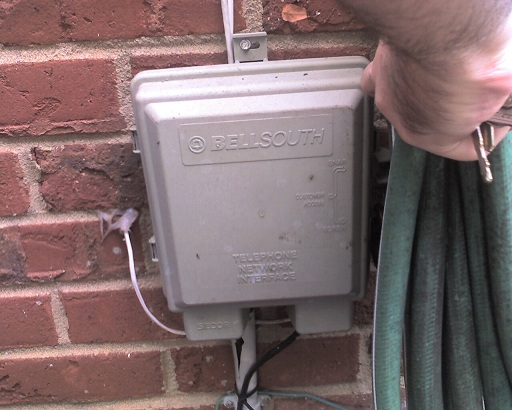
Comcast's first step into cable-based phone service was Digital Phone. What's the difference? Well, those with the newer Digital Voice (DV) may have noticed that with it, the cable comes into the digital modem (or "MTA") which is inside your house, and out of that comes the phone signal via a normal phone wire that that's fed from the MTA into a normal wall phone jack somewhere nearby inside the house, and that then feeds the rest of the house its signal. There's no more need for any phone line to come into the house, so any outside wire like at the plain old telephone system (POTS) network interface device (or "NID") is disconnected. (picture)

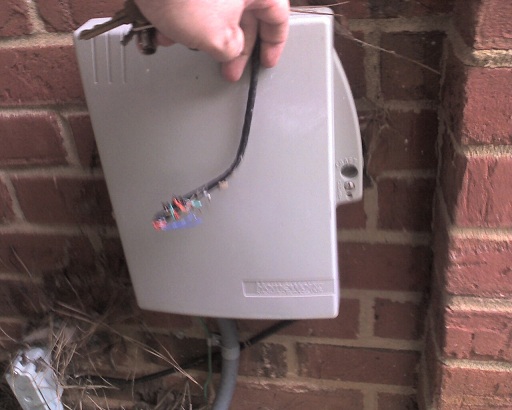
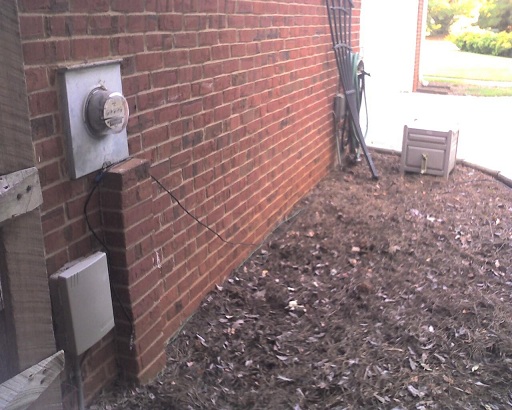
But you may (as we) for a while have used Comcast Digital Phone (which came out before Comcast Digital Voice). And it's important to understand the difference, for this problem. DP worked in a way that was closer to the plain old telephone system (also referred to as POTS). The comcast coax cable from the street went first into a box that was on the OUTSIDE of the house (very much like the one used by the POTS, but a different one: picture). And out of that DP box came both the cable (which went on into the house like it had before installing DP) and also out of it came a phone line, which then was connected to the old phone system box/NID a few feet away, specifically to the phone jacks inside it that then fed phone signal into the house just as it always had in the POTS. (here's a picture)

When they switched us to Digital Voice last year, naturally that phone line into the house (through the POTS NID) was no longer needed, so whoever did the DV install of course removed the phone line going from the DP box into the NID to feed the house, and they set up the MTA inside the house, and so on as needed for the newer DV.

But here's the kicker and what the guy found 2 weeks ago: the DV installer had not only left the old DP box (outside, which he should have removed), but he also left the cable (coax) running through that outside DP box (updated info) and inside of it, it was going through a unit intended to take the DP phone signal out to feed it to the POTS phone box. Then the cable line went out of that box and on into the house. Most important, the rep pointed out that that unit inside the DP box was powered (they had tapped into the power line when they installed that DP box a couple years ago).

Power to the old DP box was interfering with the cable signal

Well, the problem was that the power to that box (and the unit inside through which the cable signal was passing) was directly interfering with the cable signal going out (which of course feeds the TV, phone/DV, and internet service). That would explain a lot of the problems we were having!

So he removed the old DP box (and its power line) updated: opened the old DP box and removed the powered unit inside of it, leaving the box but also disconnecting the power to it. More important he connected the cable inside the unit at that point (what went from the street, and what went into the house) so it was now uninterrupted. The signal is effectively "pure" going into the house, where it then goes to the MTA (the digital modem), and that (as for the last year) feeds the phone line, and the internet service and cable TV that are from there fed into the rest of the house.

So far all has been much better.

Your next steps

If you're not sure if this may be an issue for you (maybe someone had it setup even before you moved into a house in recent years), go out and check if there's a box outside your house on a wall near your phone box that looks like the old phone box. Or find where you cable comes into the house and see if it goes through some other box first, since they may have installed the DP box (or its equivalent) elsewhere outside your house and run a long line to the old phone box. Since that old phone line will likely have been removed, you may not see that.

If you have one of these boxes, and the cable goes into it and then out of it and on into your house, you may well have this problem. Another clue will be if you do (or don't) see a thick power cable feeding into the box. Since it's powered, you won't be able to open the DP box (well, you may find it has a "consumer" side that you can open, just like the old phone system NID, for you to test the phone line outside the house, but that won't show you the cable line to see if it's going through a powered unit as I described.)

But if you have something like this, call Comcast (or your provider, if in a situation like this) to have someone come out and confirm and if so remove it (which should be free, I'd think, especially if they offered the old service to you).

You may then enjoy DV, internet, and tv a whole lot more.

Could be a broader problem

Again, the problem may be generic to other cable systems (RoadRunner, Adephia, Time Warner, Cox, Charter) if they also have offered two generations of phone-over-cable service (or your house may have had it, even if from another provider, before you moved in).

Since setting up things like DV is mostly an "all inside" thing now, some installers may never even think to look at this potential problem. All they may do is unplug the old phone line going into the house and come in and setup the MTA and say, "enjoy". I wonder how many people could be suffering this problem and not know it.

Hope that helps someone.

Update

After writing the entry, I went out to take pictures of the units (which I've added as links above, keeping them rather hi-res to make them more legible). I realized I was mistaken when I said he had removed the old DP box. He had not. But what he did was remove the powered unit inside it and disconnected the power to it (he said) and left the box. I've corrected that above. The problem with this, though, for your diagnosis is that you have no way of knowing--if you do see that second box, the DP one--whether the cable line inside it is still going through the powered unit that should have been removed. You really have no choice, it seems, but to ask Comcast (or your provider) to come out and ocnfirm this, if you are having problems that seem otherwise unresolvable. Sorry for the confusion, but still, I hope it all helps someone.
How would you run code against multiple CF versions at once using IIS on XP?

If you use IIS on XP, have you ever wished you could put your code in one directory and run it against different versions of CF, easily. In this note, I show you how.

Someone asserted on a list that some code failed as of CF8, but I tested it against 8, 7, 6, and 5, and it worked the same in all. Hearing that, someone else asked, "Charlie, are you running all those on the same machine or on vmware?"

I assume that the reader, like many, is using IIS on XP, which doesn't let you have more than one web site, which might seem to make it impossible, though some may know the tricks I'll mention.

Of course, folks running on Apache, or IIS on Win2k3 or Win2k Server, would just say, "create different web sites, and install each CF version into a different web site".

Fair enough, but how do you solve this using IIS on XP (or Wink2 workstation), if you can't have multiple sites? That's what I explain below.

Before I go on, though, let me make an important for those who may not be aware: you certainly can run multiple versions of CF on a single machine. They each get installed in their own directories, with their own JVM (as of CF6). The challenge is just to avoid port conflicts and external web server conflicts.

But why not just use the built-in web server?

Sure, if you use the built-in web server available in CFMX since 6, then you can indeed run multiple CF versions each with their own web docroot without conflict.

But that's not the point here. That would cause each CF instance to have its own wwwroot, and you'd have to put your code there to run it on that version.

And I have even explained in a recent blog entry that you can get around that using virtual mappings in the JRun web server, pointing to the shared document directory. But sometimes you really want to use IIS for some reason, or you just don't want to have to remember to use the right port and virtual directory name configured for the built-in web server.

But you can have multiple web sites in XP, if you know how...

Yep, some will want to note that you can indeed create multiple web sites in XP, if you use the right tools. I've written about such tools before. It's just that you can't run them at once, so you have to enable/disable each time you want to run the test. To me, that more of a hassle than just doing the one-time configuration which I discuss below.

So how do you configure things using IIS on XP?

OK, I hope I've headed off complaints some may have. Oh, well, I should add one more: what I'm about to show you is definitely not supported by Adobe. Some might even argue against doing it. Certainly, if you have problems with things while trying to work this way, they're going to tell you to use a vanilla setup.

Still, it's worked for me for years. In fact, I first wrote about it in a CFDJ article back in Sep 03 (co-authored with Jeff Houser). That was written in the timeframe of people moving from CF5 to CFMX and wanting to set things up this way, but the concept still applies even for those moving from 7 to 8, or 6 to 7. It also mentioned using the same approach for running against BD as well, which means it would apply also to Railo and Smith, etc.

Finally, since writing that article, I've also realized a few things I could have added to the article, which further motivates me writing this entry.

How I set things up

So, as explained in the article (which shows you the actual steps in IIS), I configure different IIS virtual directories called _cf5, _cf6, _cf7, and _cf8. I set each to points their CFM extension (and related CF ones) to the appropriate web server extension that would be used if I'd configured each server to work with IIS (like C:\CFusion\BIN\ISCF.DLL for 5, C:\CFusionMX\runtime\lib\wsconfig\1\jrun.dll for 6, and so on).

More important, I have them all point at the same, single document root (in my case, c:\inetpub\wwwroot). That allows me to then run code in that single directory against different editions, using a url like http://localhost/_cf5/somefile.cfm, or http://localhost/_cf7/somefile.cfm, or the default http://localhost/somefile.cfm goes against CF8.

Note that you must run the web server connector for each CF edition from CFMX and above, since it only builds those jrun.dlls (I mentioned above) if you do that. See the CF docs ("Installing and Configuring ColdFusion" to learn how to run that, even after CF is installed, if you installed it using the built-in web server instead.

Before you do, though, as explained in the article, be sure to save off the path to the DLL for .cfm file extensions, as running the configuration tool will wipe over the previous path.

Some concerns using the CF Admin in this setup

There's something else to take note of about using the CF Admin (/cfide/administrator/index.cfm) when you set things up this way.

It has to do with whether, when you install each version, you tell CF to install using the built-in web server or using IIS.

In the former case, CF will put that version's CFIDE directory (and all its related files) into the wwwroot for that built-in CF server, such as c:\coldfusion8\wwwroot\ for CF8, or c:\cfusionmx7\wwwroot\ for CF7.

In the latter case (if you tell CF during installation to use IIS), then CF will place those files into the IIS docroot you name. Assuming you would always choose that c:\inetpub\wwwroot directory, that means that its CFIDE directory will be replaced with whatever is the last CF version you install.

And that means that even if using the virtual directories above, they'll all point to the last CFIDE version, which won't work (the CF Admin can only run in the version for which it's created).

Either way, you can solve this by creating yet another virtual directory, for CFIDE, inside the version-specific virtual directories above.

So if during the installation of 6, 7, or 8 you told CF to use the built-in web server, you'd point the new CFIDE virtual directory to the builtin web server's CFIDE. For my _CF6, for instance, I'd create a CFIDE virtual directory within that to point at c:\cfusionmx\wwwroot\CFIDE.

If instead you choose to install each version using IIS, then just as you needed to save off the file extension's path to the web server DLL, you would similarly need to remember before each install to save off a copy the CFIDE directory for the previous release. This is especially key for CF5, since there is no concept of a built-in web server for that.

Back when I installed CFMX 6, before doing so, I copied the CFIDE directory to call it CFIDE5 instead. (Sure, you could do a rename, but only JUST before you installed, in case you need it.) Then I created the CFIDE VD within the _CF5 VD to point to that.

It may be worth noting here that if you do install CF 6/7/8 using the built-in web server initially, and then use the web server configurator tool to then connect them to IIS, that does not move the CFIDE from the built-in web server root to the IIS docroot. So again you will need to point your CFIDE virtual directory to that CFIDE in the built-in web server.

Why not just use the built-in web server for the CF Admin?

Of course, you could just use the built-in web server to access the Admin instead, even if you are otherwise running code via IIS.

And going back to the original writer, you could indeed also do this using VMWARE. (I've written about how versions of it and Virtual PC are now free.) It might be overkill, though. Again, you don't need to worry about running multiple versions of CF on a single server. It's all just about avoiding port conflicts and potential external web server conflicts.

That's what this has been about all about: how to run all your code via IIS against multiple version of CF, all from a single directory.

Conclusion

Did this help you? Let me know. Did I forget something? Got a complaint? (People seem to love that opportunity. Go for it.) I hope it has helped some of you. It's certainly helped me, and others who I've shown it to.

Resources for getting into the Multiserver (multiple instance) implementation of CF

You may have heard of the new Multiserver deployment option that was introduced in CFMX 6.1, also known as "multiple instances". It can bring tremendous performance and reliability improvements, allowing you to segregate apps on a single server either by function, or reliability, and so on. It can also help you manage memory more effectively.

Since many people may only be considering the feature now (either only now moving to 6.1 or 7, or 8), I want to share some resources if you're new to it. (The question came up on a list, and I offered the info there, so thought I'd pass it along here.)

First, there are a couple of articles from that time 6.1 frame:

"Introducing Multiple Server Instances in ColdFusion MX 6.1", by Tim Buntel

"Using Multiple Instances with ColdFusion MX Enterprise 6.1" video

Now, CF7 did introduce the new Instance Manager within the Admin, and that (and instances in general) is covered in the CF manual:

Configuring and Administering ColdFusion MX (Chapter 7, "Using Multiple Server Instances")

Finally, there is also a new Adobe article as of CF7:

http://www.adobe.com/products/coldfusion/whitepapers/pdf/cfmx7_mulitpleinstances.pdf

There are certainly other articles folks have done in the CFDJ or at CommunityMX.com, but these should get you started.

Even though it's old news to some, it does seem that like many things, use of instances is something that may have been missed by folks. I've been contemplating a new user group presentation on the topic. Nothing new for CF8, but it seems people are considering things now that they may have ignored when 6, 6.1, or 7 came out (which is why I did my daylong class at CFUnited on what was new in 6 and 7 that folks may have missed).

One last point, if those don't make it: if you're running on Windows, don't try to create an instance with a JVM heap greater than about 1.3 GB. Though Windows should allow 2GB per app, this is just a number many found that beyond which CF won't start. Hope that all helps.

CF8 Admin Changes: A compendium of new/changed features since 7.02

Are you aware of all the changes that have been made in the CF Admin as of CF8? You may have seen mentions of little changes in CF8 (indeed, I've done a full hour user group talk on hidden gems), and while I mention some changes in the CF8 Admin (as I or others have noticed them), I've not seen any definitive list (from Adobe or the community) of all the changes (small and large) that might have occurred in the CF Admin interface. I figured I'd take up that challenge.

I've gone through and compared the CF Admin between 7.02 admin 8, and found changes that reflect:

  • new major features you've probably heard about (whether to enable "per app settings"; limits on the number of cfthread threads; options to enable/control the new interactive step debugger; support of the new Server monitor; support of per-user access to the Admin and RDS)
  • new minor features you may have missed (options to "disable CFC type check" and "disable access to internal CF java components"; options to limit the number of simultaneous requests from Flash Remoting and web services clients and CFC methods called from a URL; options to set request queue timeouts and set jrun request limits; new options to control mail server authentication; new db drivers; new option to log activity on enterprise databases; new option to perform a validation query when a connection from the pool is first used/reused; new ajax debugger window; ability to pause a scheduled task; 3 new flex-based gateways; minor additions in CAR file creation)
  • realignment of related settings (request tuning settings)
  • renaming of various pages and settings

Here are all the changes I could find, discussed per page:

A. Server Settings Section

Settings Page

  • "Maximum number of simultaneous requests", "Maximum number of report threads", moved to new Request Tuning Page
  • "Maximum size of post data" moved to bottom of this same page
  • New "Enable Per App Settings", "Disable CFC Type Check", "Disable access to internal ColdFusion Java components", and "Watch configuration files for changes" (latter for WebSphere ND)

New Request Tuning Page

  • Besides holding the "Maximum number of simultaneous requests" setting (renamed here in CF8 as "Template" requests) moved from the old Settings page, this page now permits setting limits on number of simultaneous requests from flash remoting and web service clients, as well as CFC function requests (not calls to CFC methods from CFML but those made via a URL, such as from a browser or Ajax client, etc, when not using ?wsdl)
  • Besides holding the "Maximum number of simultaneous report threads" setting (renamed here in CF8 to add "simultaneous") moved from the old Settings page, this page also permits setting limits on number of simultaneous CFTHREAD threads
  • Page adds 2 new "Queue Timeout" settings/li>
  • Page adds 2 new "JRun Master Request" limits

Mail Page

  • New Username and password fields to hold SMTP server authentication info (previously, had to know how to add it to the mail server name using username@password:servername in the mail server field). Use of password field offers protection of password from someone watching over your shoulder.
  • New "Connection Timeout" and "Enable SSL Socket connections to mail server" and "Enable TLS connection to mail server" options, each permitting greater security and control over authentication to SMTP servers (particularly Google mail servers)

B. Data & Services Section

Data Sources Page

  • New driver types: "Apache Derby Client", "Apache Derby Embedded", to support the newly available Apache Derby database, and "MySQL 4/5" (in addition to existing MySQL 3) and "PostgreSQL"
  • In "Advanced Settings", new "Log Activity" option (to log database activity to DB) for Enterprise drivers (SQL Server, Oracle, Informix, Sybase, and DB2).
  • In "Advanced Settings", new "Validation Query" option (called when a connection from the pool is reused), available for use with all driver types

Verity K2 Server Page

In "Advanced Settings", new option to enter K2 Admin Username and Password.

C. Debugging & Logging Section

Debugging Output Page

  • Page name changed from just "Debugging Settings" (due to addition of new "Debugger Settings" page listed below).
  • New "Enable AJAX Debug Log Window" option, which allows display of the AJAX debug log window when the cfdebug flag is passed in the URL (also relies on IP address settings to control who sees this)
  • "Enable Debugging" option renamed to "Enable Request Debugging Output"

New Debugger Settings Page

Enable, configure, and control interactive step debugger in Eclipse.

Scheduled Tasks Page

New option to pause a given scheduled task (new button in list of buttons to left of each scheduled task)

Systems Probes Page

Field for "Notifications Sent From" renamed to simply "E-mail".

Code Analyzer Page

Changed to list CF8 tags and functions in "Advanced Options" page.

D. New Server Monitoring Section

Offers links to the new Server Monitor and Multiserver Monitor.

E. Event Gateways Section (used to be Enterprise-only)

Gateway Types Page

New Flex-based gateways: "DataManagement", "DataServicesMessaging", "FMS"

F. Security Section

Administrator Page (renamed from "CF Admin Password" page)

Offers new interface to use either a single Admin password (as before), or separate username/password (per authorized admin user, as enabled in new "User Manager" page listed below), or no password required at all

RDS Page (renamed from "RDS Password" page)

Offers new interface to use either a single RDS password (as before), or separate username/password (per authorized RDS user, as enabled in new "User Manager" page listed below), or no password required at all

Security Sandbox Page

"CF Tags" and "CF Functions" tabs for adding/editing a sandbox have been changed to list CF8 tags and functions.

New User Manager Page

Enables adding users who should be given access to either RDS, CF Admin, or Admin API functionality.

G. Packaging & Deployment Section

ColdFusion Archives Page

When adding/editing an archive, the popup window that is shown offers several sections, and the following changes have been observed:
  • Server Settings: "Locking" section has been removed, while "Watcher Settings", "Server Monitor Settings", and "System Probes" have been added
  • New "Web Services" settings page, with provided "pre-restore" and "post-restore" lists

J2EE Archives Page

When adding/editing an archive, there is a new "Previous Serial Number (if upgrade)" option.

Where to learn more

To find out more about these changes, see the online help available in the CF Admin, available on each admin page.

Or see the ColdFusion documentation manual, "Administering and Configuring ColdFusion 8", available at CF docs page.

I realize that some reading this will be moving from CF 6, 6.1, 7, or 7.01. I'm afraid I can't detail here all the changes between those releases. I have, however, got a day-long class I offered at CFUnited on "New in CFMX 6/7: What you may have missed", where I do outline changes in each of those releases (and intervening updaters). If you're interested in taking that class, drop me a note or leave a comment here. I am thinking of offering it as an online class (and plan to do the same regarding all changes in CF8--outside of the Admin). Hope all this helps others.

Ever tried the SMS client simulator in CF7 and above? If it fails to launch, here's why

If you never paid much attention to the hubbub about SMS gateways when they came out in CF7, you may have missed that there is an available SMS Test Server and even a client (phone) simulator for working with this feature, both built into CF7 (and 8). You can learn more about these at the URLs below.

But I want to pass on a tip about something that tripped me up when I first tried to "play with" the new phone simulator. I would launch the SMSClient.bat file (in the cfusionmx7/bin directory), and a DOS window would open (and stay open) but I'd never see the simulator.

I finally figured it out: you need to have started the SMS Test Server (done in the "Event Gateways">"Settings" page in the CF Admin).

I also just noticed that there are also a couple of log files created in the same directory as the bat file, which probably would have clued me in. (Even though I've now stopped the test server, I can't get the client to recreate the problem--it now always shows up. I'm sure a restart would solve it and the log may then have told me what to do, but I missed the log before, so I still think this info worth passing along.)

To learn more about the SMS client and server simulators in CF7 (and 8), see:

Kevin Schmidt's Dev Center article

The CF docs

When pressing enter on an input text field will suddenly not submit the form...sure surprised me!

Most know that a form will submit if you press enter while the cursor focus is on a text field (INPUT TYPE="text"|"radio"|"checkbox"). Some have surely noticed that you don't often even need a submit button, which can be nice when creating some simple interfaces.

But did you know that the submit will not happen if you have two input text fields (and no submit button)? I found this when I had a long-working form of this sort, to which I added a second input field. Suddenly, it stopped submitting on pressing enter. I've tested this in either IE 6 or Firefox 2. I explain the scenario and a solution, below.

The problem

I had a small form on my UGTV recordings list page, which let users enter search criteria. Today, someone asked me to let them indicate how many records to show by default, and when I added a second input box for that, suddenly the submit would not work. (If you look, you'll find the 2nd input field at the bottom of the form, but it doesn't matter. It's within the one form, and the problem happened regardless of where the 2nd field was placed.)

Again, the key is that I have no submit button in this scenario (as it would just look clunky, and is otherwise unnecessary).

Some solutions

So I did some digging and found that indeed others have observed this. One suggestion offered was that you provide a submit button but use CSS to make it invisible. You can't really use "display:none" because then, in IE 6 at least, it still thinks it's not there.

But you can set its height and width to 0 and set the border to none, and it solves the problem:

<input type="submit" style="width: 0px;height: 0px;border: none">

If you'd like some simple code to test with, here you go:

<form action="">
<input name="i1" type="text"/>
<input name="i2" type="text" />
<input type="submit" style="width: 0px;height: 0px;border: none">
</form>

If you're curious about the empty action, that just makes the page self-posting. If you're interested in that, or have any comment on that aspect, please see my other blog entry on the subject.

Stuck sending email from a hotel or other blocking environment? Here's a solution when others fail

Hope this may help others. If you're in a situation where you find you can't send email out of your mail client (like Outlook or Thunderbird) because the ISP (or hotel, or client location, for instance) is blocking all outgoing mail (SMTP and the default port of 25), you have a couple of solutions. The common ones (more below) weren't working for me, but I found this gem. Did you know that if you're a gmail account holder, you can setup your mail client to use gmail's mail server to route your outgoing mail through? Yep. It really works, and saved my bacon today! :-)

Important Update

Well, I have to report some news since learning of this and posting about it. It turns out that this approach has the unfortunate side-effect that it makes your note go out as "from" your gmail account--even if you sent it as "from" another account in your mail client. That's a real bummer. Again, perhaps better than nothing, but not what I'd expected. On the surface, it may seem only a nuisance. If you read your gmail mail with your mail client (via POP), then you may not even notice this. But I did notice that the "to" address on replies sent while using this was my gmail address, which is not what I'd expected. And I just checked, and indeed the recipient also sees the email as coming to them "from" your gmail account. If either is a concern, then be aware.

There is a real gotcha, though, if you reply to a list. I had a note from a list that came, as expected, "to" my carehart.org address. When I replied, it would normally go back as "from" that address, which is the address on file at the list. But this change to the gmail address meant the note now went from an address not on the list. Some lists will bounce such notes, so you'll now it's happening (and now you'll understand why). But this list is one where if you send a note from a non-subscribed address, it just ignores it--so the note never got to the list. Only now did I connect the dots. Forewarned is forearmed!

You may not want to *always* do it, but when you're stuck in a hotel and need to get mail out, it's a blessing. I learned of it while traveling at the WebDU conference in Australia and after the conference was staying in a small hotel that was blocking my email. i couldn't get their smtp server address to use instead (more on that below), but using gmail as the smtp server worked!

Here's the blog entry that clued me into the solution. Many thanks to him.

As for how to configure your mail client to this up, the blog entry above gives the basics. You just want to change the SMTP (outbound) setting to use smtp.gmail.com, and port 465 (telling it to use SSL). You also want to configure the login authentication (for sending mail only) to be your gmail account. If you're really not sure how to change your mail settings, this trick may be above your level. But I will point out that Google themselves offer a page of info showing how to configure your mail clients. Just note that it's showing how to setup the client to both send and receive gmail. This trick is JUST about setting up to send email via gmail. Don't delete the incoming (pop) mail settings in your email client for your mail connection.

One last point about the option above: you do need to configure Gmail to permit POP access, as discussed here. But note that you don't HAVE to use pop (meaning a mail client) if you prefer to keep reading gmail via its web interface. If you never connect via pop, it will still be accessible via the web. Also, notice that even if you do collect it via pop (as I do), there's an option there to keep the mail in Gmail's inbox, if you prefer, so it's till always accessible via the web (though the web interface has no way of marking mail you read on your mail client).

Here's one other benefit of this approach of routing email through gmail: have you ever gotten bounces when sending mails because the recipient's mail server says yours is blocked in the "relay blacklist" or similar? This can happen on a hosted mail server because some chucklehead on the same server is involved in spamming, and gets your entire SMTP server detected as a spam source. Using this gmail approach would seem to prevent that (though I suppose some day some idiot will find a way to cause gmail's server to be blacklisted--but they'll certainly be a lot faster to address that than your average hosting provider, I think.)

What are some of the other solutions? Well, here's one entry on some alternatives and following is why they didn't work for me. Still, if you don't use Gmail (or don't want to use the approach above), they're worth noting:

  • Get the hotel (or ISP) to tell you the name of the mail (SMTP) server they prefer you to use, and use THAT in your mail client. Sadly, it's not always possible to get that from the hotel or client staff.
  • Use a webmail interface instead. There's almost always one provided by your email provider, and beyond that there are tools that will serve to do it for you even if yours does not (like www.mail2web.com). But I much prefer to have all my mail (in and out) saved in my mail client, both for archival and searching purposes.
  • Use a 3rd party mail relay service, like smtp.com and smtpanywhere.net. If I hadn't found the gmail solution, I was about to do this. Couldn't find any that are free.
  • Use a tool like JiWire HotSpot Helper, which does mail relay and more (like enabling secure email login and transmission, which is more important than many realize), but it's not free (there is a free trial).
  • Use SSH tunneling, as discussed in a nice write up. Unfortunately, I tried it and my mail host doesn't support it. I've asked them.
  • (Added since original post) Since only port 25 specifically may be blocked for you, you may find that your mail provider offers an alternative port to use to collect email. Mine does not, though as above, I have asked. (This was mentioned in the article I pointed to, but I didn't think to bring it up here in this list. A couple of commenters wanted to stress it as an option, so I'm adding it.)

If there are any other solutions I've missed, please do share. Hope this helps someone.

CF-specific Google search engines (yes, that's plural)

Well, I was tickled to learn about the nifty feature Google's added to let people create "Custom Search Engines" (or CSEs), which can limit searches to a given set of sites, with the intention that this could produce a better topic-specific search. Wouldn't it be nice to search for Ajax and only get sites related to CF implementations and discussions of Ajax (versus other implementations, or the cleaning product?)

So I set off this weekend to create just such a CSE. You can find it here:

Charlie Arehart's CFSearch. It searches over 1,000 CF-related sites.

< href="http://www.google.com/coop/cse?cx=012970358153442150397%3Aekun5bf_8-m">

And then there were two...

But just as I was about to excitedly announce it to the world yesterday, I happened upon an entry in the google Co-op forums related to CSEs when I saw a post from good ol' Joshua Cyr . He was announcing (in October) to a forum there that he'd created one (http://www.cfhunt.com) and would they consider listing it on the featured sites page.

Imagine my dismay. He'd beaten me to the punch. Now, I was about to let it go, and just concede that really only one needed to exist, so I didn't even announce mine yesterday.

And then there were three...

But then today on a CFML list someone else (Jeff Gladnick) announced that he had created one (http://www.cfsearchengine.com). While it was ironic that yet another person had the bright idea just this weekend (it seems), it also struck me as tragic.

Each of us has spent the time gathering over 100 URLs to be searched in our CF-specific CSEs. I know it took me a few hours. I poured through about 300 of the top URLs coming back from a Google search for "ColdFusion". I have docs pages, blog pages, user group pages, CF product pages, and more. And I even went so far as to use a special feature in the CSE setup called contexts, where you can subset URLs such as by those topics (docs, blogs, etc.) Of course, then I saw so had Joshua! :-)

Turns out there are several...

So I'm here to serve several purposes. I want to point out all the CF-related CSEs I've found or been told about (yes, there are more), and hope to warn off any who would create another. We've got enough. They are listed below in descending order of their current count of sites indexed (viewable on their respective CSE home page). A couple have those other domain names by which you can find them:

Michael and Judith Dinowitz's (2544 sites):

http://google.com/coop/cse?cx=007073765987311344167:ci0-oyljemw

or via

http://www.houseoffusion.com/search/

Charlie Arehart's (1338 sites)

http://www.google.com/coop/cse?cx=012970358153442150397%3Aekun5bf_8-m

Jeff Gladnick's (828 sites):

http://www.google.com/coop/cse?cx=016470950001878139406:ttj6oz4dukc

or via

http://www.cfsearchengine.com

Joshua Cyr's (194 sites)

http://www.google.com/coop/cse?cx=011762892154798364121:8ekkxumnm6g

or via

http://www.cfhunt.com

Adam Howitt's (36 sites):

http://www.google.com/coop/cse?cx=007221746090449490499%3Aliubjduev9o

or via

http://www.webdevref.com/

Pete Freitag's (29 sites):

http://www.google.com/coop/cse?cx=014001148856677045459%3Aih4w5ipkl6c

Mark Gaulin's (11 sites):

http://www.google.com/coop/cse?cx=011257526413916725596:ayerfqdweyg

Ray Camden's (3 sites):

http://www.google.com/coop/cse?cx=002988318612745418124%3Ae5ryuhjfoyq

And anonymous (2 sites):

http://www.google.com/coop/cse?cx=003208873850437307260%3Adbdsbawqu68

If you know of any others, drop me a comment below.

Update
Since the time of the original posting, I have indeed learned of another:

Fig Leaf's GotAdobe.com:

http://www.gotadobe.com/

And if you're thinking of creating another...

But let me say that if you find for some reason that one of the CSEs doesn't search one or more sites you think it should, you don't need to go create another one (I don't think that was the case with any of us). Instead, you can choose to volunteer to contribute to any of the existing ones.

Who's should be crowned the ultimate one? Well, I think Joshua's the oldest, and it has the most sites indexed (for now). There's no real harm in the others remaining. Heck, like so many things on the web, sometimes dupes just mean better chances of someone finding a thing.

Why isn't it easier to find all existing ones?

I will say that I've complained to the folks at Google to have them add a means to search for existing ones. That would help both those looking for one, and those thinking of creating a new one. I looked on that featured examples page, and seeing none for CF, thought I'd do the CF community a favor. Now, instead, I see that others are reaching the same conclusions.

I will also add that the folks at Google told me (on the forum, in reply to my question) that s short-term solution is for one to use a particular set of google keywords that might help find CSEs on a specific topic:

site:google.com inurl:coop/cse topic

Sadly, that's imperfect, as it found only 3 of the CF CSEs, and not even the 3 with the most sites (I know mine's new, and perhaps Jeff's is, but Joshua's has been around since October, so this failure to find them using the search feature is dismaying, and I told Google that).

Based on a few comments below, I have added a couple more (Adam's and the HouseofFusion CSE), as well as updated Jeff's site count. I don't want to keep this up to date. As I say above, you can see the site count via the "real cse home page" link for each CSE.

More Entries